Monday, December 5, 2011

Local video playback & video upload in Picasa Mobile


A new version, 2.6.0 of Picasa Mobile including local video playback as well as video upload is now available from the Android Market.

Also, for all types of uploads, the progress percentage is now displayed when you drag down the upload icon from the notification area.

Monday, November 21, 2011

Picasa Mobile's main menu has a new look

Starting with version 2.5.0, Picasa Mobile's main menu has a new look. The new design replaces the old list view with a grid-based interface that facilitates identifying and selecting the right menu item.

Although the old menu was looking reasonably well on a phone, it was not the best choice for a tablet. The new layout adapts itself depending on the device's resolution, as well as and the current orientation.


Many thanks to Dan and Matth for suggesting this change!

Sunday, November 13, 2011

Pich-zoom functionality in Picasa Mobile

We released today a new version of Picasa Mobile (2.4.0) that includes a very often requested feature: pinch-zoom. For best zooming results, please make sure the highest photo resolution is selected in Settings/Photo Browsing.

While in zoom mode, you can also pan the image by dragging it.

Many thanks to John, Lester, David, Ernst and Tzinzo for suggesting it.

Tuesday, November 1, 2011

Moving Web Photos in Picasa Mobile

We just released a new version of Picasa Mobile, 2.3.3, that allows users to move web photos to a different album than the one they currently reside in.


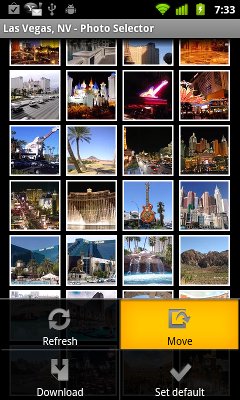
To use this feature, in the Web Photo Selector, tap the Menu key.
From the options menu that appears, choose "Move".


Tap the thumbnails of the photos you want to move to select them.
The selected photos are displayed with a green border.

To unselect a selected photo, tap once again on its thumbnail.
The "Move" button shows you the number of selected photos (8, in this example).

Make sure all the photos you want to upload are selected, then tap on the "Move" button.


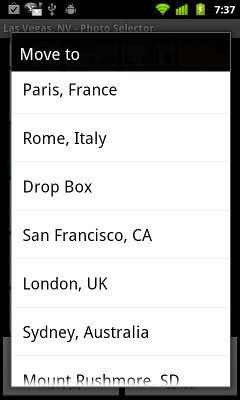
You will be prompted  to select the target album. Select the desired album from the list and you're done!


Alternatively, the photos can be moved one by one by long-pressing on the thumbnail, then choosing "Move" from the context menu that appears.

Many thanks to Bob for requesting this feature and patiently waiting for it to be implemented, while supporting me with his kind emails!

Sunday, October 9, 2011

End of Support for Android 2.1 Starting with Picasa Mobile 2.3.0

Starting with Picasa Mobile 2.3.0, the support for Android 2.1 devices ends.
Android 2.1 is now used by less than 1% of our users and this change was needed in order to lay out the groundwork for new and awesome features only available in Android 2.2 and up.

If you are still on Android 2.1, your downloaded version of Picasa Mobile will continue to work, but you will not be able to receive updates until you upgrade to Android 2.2.

Stay tuned for more details.

Wednesday, October 5, 2011

Google Giveth, Google Taketh Away

On a day like today, if you're an Android developer, it's easy to feel like you're loosing it...

The Android Market has had, yet again, tons of problems. Of course, the average user doesn't know that.
And of course, they blame the developer and punish him with bad ratings and scathing reviews.

Some of the users have the decency to contact the developer with questions before shooting from the hip.
Others stick to their one-star guns.

On some level, I understand them. They need somebody to blame for spending $0.99 on an app that refuses to download. And it's hard to believe that Google is the culprit.

Of course, Almighty Google could do a lot to improve the situation for everybody. That is, if they cared...

In the good tradition of openness we came to expect from Google, they could admit that they have a problem (9 out of 10 experts say it's the first step on the path to recovery:)).
More importantly, they could provide a way for the developer to visibly respond to unsubstantiated claims from users.

For now, I suggest putting a red banner at the top of the Market app, something like the weather warnings on TV:

Severe Android Market conditions in effect. Use it at your on risk of being frustrated and disappointed.

I'm joking, of course. But something is very rotten in Googleland...

Picasa Mobile 2.2.8 is now live

This new release adds multi-select download for your and your contacts' photos.

Many thanks to Jim for suggesting it.